Android SMS Gateway: Send SMS from Your Phone for €0.01
Android SMS gateway — turn any phone into a personal SMS sender. €0.01 per message, your own SIM, real number shown to recipients
Aleks Sav from SMSPM
1 July 2025
Updated 30 June 2026
Most bulk SMS platforms charge you €0.05 to €0.45 per message depending on the country. An Android SMS gateway cuts that to €0.01 per SMS for any carrier you have a local SIM for — by using your own Android phone as the sending device. This is a feature inside SMSPM, and it’s a useful option for small businesses, app developers, and anyone sending transactional or reminder SMS at scale. Here’s how it works and why it’s worth trying.
What Is an Android SMS Gateway?
The Android SMS gateway is a routing option inside SMSPM. Instead of sending your SMS through a commercial provider, the platform pushes the message via Firebase Cloud Messaging to a connected Android phone, which then sends it from the phone’s SIM card — exactly like a regular text message.
From the recipient’s perspective, the SMS arrives from a real, callable phone number. Not from “Info”, “Authmsg”, or a random short code. From your actual number.
What Is an SMS Sender ID — And Why Operators Strip It
An SMS sender ID is the label that appears on the recipient’s phone where the sender’s name would be — for example “YourBrand” instead of a phone number. Mobile operators have been steadily stripping these alphanumeric sender IDs from incoming SMS traffic. A message you send as “YourBrand” often arrives as “Info” or a generic label — depending on the operator and country. This is accelerating, not slowing down.
When you route through the Android SMS gateway, the recipient sees your SIM card’s number — a real mobile number they can:
- Call back directly
- Save to their contacts
- Reply to (replies go to the phone’s inbox)
For local businesses sending appointment reminders, delivery notifications, or promotions, this makes a meaningful difference in trust and open rates.
Android SMS Gateway vs. Commercial SMS Providers
The cost difference between routing through an Android SMS gateway and going through a commercial SMS provider is significant. Here’s the direct comparison:
| Route | Cost per SMS |
|---|---|
| SMSPM commercial gateway | €0.02 – €0.45 (carrier-dependent) |
| Android Gateway | €0.01 flat |
The €0.01 is SMSPM’s platform fee — it covers infrastructure, push delivery via FCM, and routing logic. Your SIM card charges are separate and depend on your mobile plan. In most countries, standard mobile plans include a large monthly SMS allowance (1,000 is typical) — so in practice, you often pay only the €0.01 platform fee per message.
Example: 1,000 SMS to a Turkish carrier via commercial gateway at €0.12 each = €120. Via Android SMS gateway with a plan that includes 1,000 free SMS = €10. That’s 92% less. See the per-country rate on our SMS pricing page for the commercial baseline.
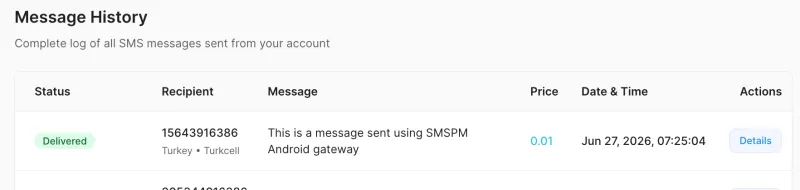
A Practical Use Case: Mixing In-Network and Cross-Network Routing.
In a lot of countries, mobile plans include a large or unlimited SMS allowance — but only for messages sent within the same carrier’s network. Texting a number on another carrier still gets charged per message, or isn’t covered at all.
This is exactly the situation the Android Gateway is built for. Instead of routing all your traffic through one phone, you can set it up per carrier:
- Connect a phone with a SIM from Carrier A and route only Carrier A’s traffic through it — those messages land in your free in-network allowance, so you’re only paying SMSPM’s €0.01 platform fee.
- Leave every other carrier (B, C, D…) on SMSPM’s standard commercial gateway, where pricing is transparent and per-carrier regardless of network.
If a large share of your recipients happen to be on one specific carrier, this alone can cut your effective cost per message significantly — without having to chase down a SIM for every operator in the country.
It also scales: SMSPM lets you connect more than one device, and each carrier route can point to a different phone. So if you have SIMs on two different networks, you can pair two phones and assign Carrier A’s traffic to Phone 1 and Carrier B’s traffic to Phone 2 — each one billing against its own carrier’s in-network allowance, while anything outside those two carriers still falls back to the commercial gateway automatically.
Setup is the same per-carrier routing described above (Prices → Route column) — you’re just doing it carrier-by-carrier instead of all-or-nothing.
You Can Start for Free
SMSPM has no monthly fee and no minimum spend. Create a free account, top up with as little as you want, and you can test the Android Gateway immediately. The setup takes about 5 minutes.
The only thing you need:
- An Android phone running Android 8.0 or higher (most phones from 2017 onwards qualify)
- A SIM card in it
- The SMSPM Gateway app (APK download from your dashboard → Devices page)
Use Your Android Phone as an SMS Gateway — Step by Step
Here’s how to set up your Android phone as an SMS gateway with SMSPM. The whole process takes about five minutes.
Step 1 — Download and install the app
Go to your SMSPM dashboard → Devices, and download the SMSPM Gateway APK. Install it on the Android phone you want to use as a gateway.
Step 2 — Grant permissions The app needs Send SMS, Phone State, and Notifications permissions, plus a battery optimisation exemption so it stays alive in the background. On Xiaomi/MIUI phones, go to Settings → Apps → SMSPM Gateway → Battery → No restrictions.
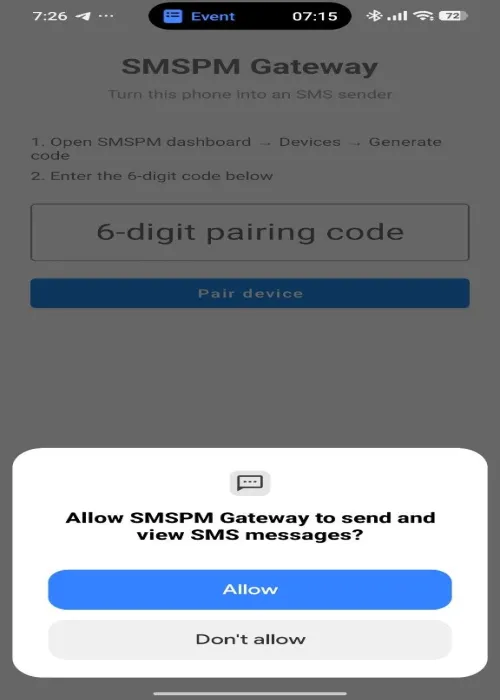
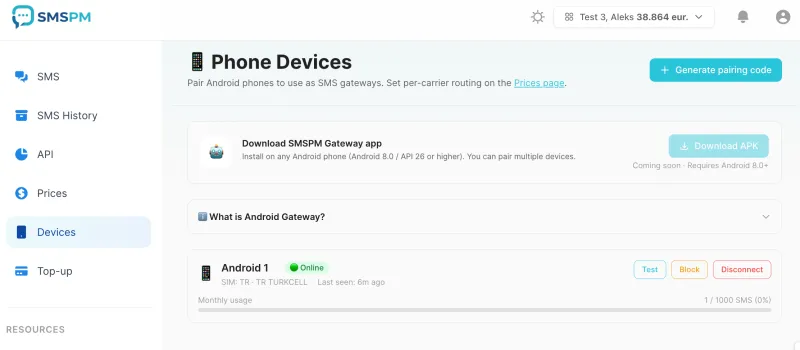
Step 3 — Generate a pairing code In your dashboard → Devices, click Generate pairing code. A 6-digit code appears, valid for 15 minutes.
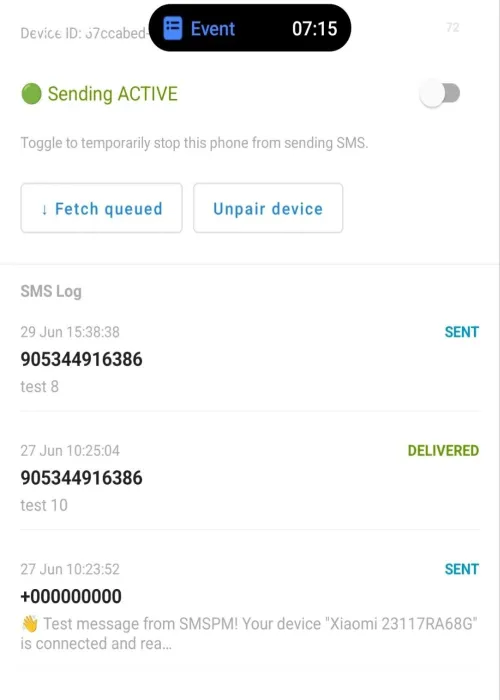
Step 4 — Pair the phone Enter the code in the app and tap Pair device. The dashboard detects the pairing automatically and shows your device.
Step 5 — Set up routing Go to your dashboard → Prices. For each carrier you want to route through your phone, find it in the table and change the Route dropdown from “SMSPM (default)” to your phone. The change takes effect immediately.
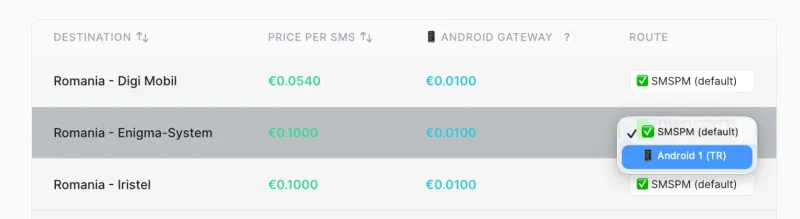
Step 6 — Send
Send SMS normally via the dashboard or API. Messages matching your phone’s route are automatically pushed to the device and sent from your SIM.
What Happens If the Phone Is Offline?
By default, fallback is enabled: if the phone is unreachable, the message is automatically re-routed via SMSPM’s commercial provider within 10 minutes. No SMS is lost, and your balance isn’t double-charged.
If you disable fallback, the message waits in a retry queue for up to 24 hours, retrying at increasing intervals. When the phone comes back online, opening the app and tapping ”↓ Fetch queued” immediately re-dispatches all waiting messages.
Common Questions
Can I connect multiple phones?
Yes — as many as you like. Each carrier route can be assigned to a specific device.
Can I route different carriers to different phones?
Yes. This is a common setup if your mobile plans include free SMS only within their own network — pair one phone per carrier and assign that carrier’s route to its matching device. Traffic to carriers you haven’t connected a phone for falls back to SMSPM’s commercial gateway automatically.
Does this work with dual-SIM phones?
Yes, using whichever SIM is set as default for SMS in Android settings.
Does the app need to be open?
No. It runs in the background via Firebase Cloud Messaging and wakes when a message needs sending.
Is there a monthly sending limit per device?
Default is 1,000 SMS/month per device, configurable from the Devices page. Set it below your plan’s free SMS allowance to avoid carrier charges.
Is the €0.01 charged if the message fails?
The charge is on dispatch, not delivery — same as all SMS providers. If fallback is enabled and the phone is unreachable, the message re-routes via commercial provider at normal rates.
Ready to Try It?
Create your free SMSPM account and connect your first Android device. No subscription, no minimum spend — just €0.01 per SMS through your own SIM card.
View pricing by country →
Read the full Android Gateway documentation →
Ready to start sending SMS?
Join thousands of businesses using SMSPM to reach their customers globally.